
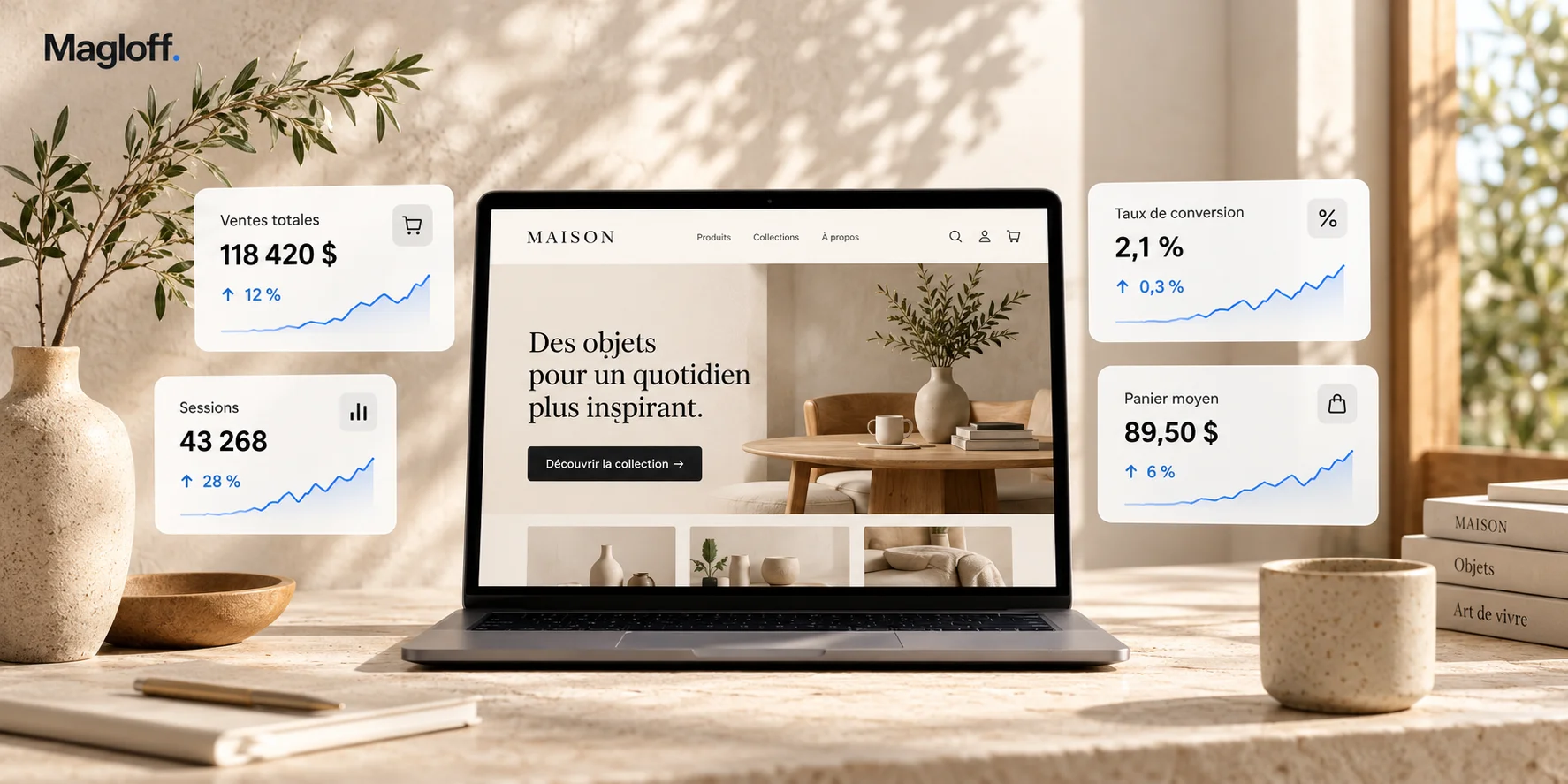
Your Shopify store is generating orders. The ad campaigns are running, the products are finding their customers and, on paper, nothing seems seriously broken. And yet results aren’t moving as easily as they used to.
Revenue is growing more slowly. Acquisition costs are rising. Some months beat expectations while others are hard to explain. You add budget, test promotions or rework certain pages, without ever getting back to a growth trajectory that feels genuinely clear.
That is exactly what makes this situation worth analyzing.
When a store isn’t selling at all, the problems are usually fairly visible. When it’s already working, the blockers tend to be more diffuse. They hide in the mobile experience, the quality of the traffic, the way the catalog is presented, the shipping policy, variant selection, promotions, data or operational processes.
Taken individually, none of these elements necessarily looks critical. Together, they can make a significant difference to growth.
It’s also why I’m wary of off-the-shelf advice along the lines of “increase your traffic,” “improve your conversion rate” or “redo your product pages.” Before choosing a solution, you need to understand where performance is actually being lost.
When a Shopify store is selling but has plateaued, what should you analyze first?
There is no single metric that can answer that question.
Conversion rate matters, of course, but it only tells part of the story. A Shopify store can underperform because of its acquisition, its positioning, its merchandising, its mobile experience, its shipping terms, its payment options or even an internal organization that has become too complex.
The goal of an e-commerce audit, then, is not to find as many things to change as possible. It’s to identify the few elements that are genuinely limiting performance today, and then to address them in the right order.
Here are 17 signals I regularly examine.
1. Your traffic is growing faster than your revenue
This is often one of the first things I look at.
A business sees its sales slowing down and naturally concludes it needs to attract more visitors. But if traffic has already grown significantly while revenue has grown much more slowly, the problem most likely lies elsewhere.
In that case, pushing acquisition even further mostly risks sending more visitors into a journey that converts less well than it should.
What you need to look at is what happens between the visit and the purchase: which traffic sources are growing, which ones convert, how new visitors behave, which devices or markets are falling behind and whether the quality of the traffic has changed.
Two stores can show exactly the same traffic growth and be in completely different commercial situations.
2. Your campaigns show an excellent ROAS, but the business is barely growing
A high ROAS in Google Ads or Meta Ads is good news. It is not, however, sufficient proof that your acquisition is actually creating growth.
Ad platforms attribute sales according to their own logic. They can easily take credit for orders that would have happened anyway, particularly on branded search, remarketing or audiences that are already highly engaged.
Conversely, a campaign with a more modest ROAS may do more to introduce the business to new customers.
When I analyze a Shopify store’s acquisition, I therefore try to reconcile the advertising numbers with the business’s actual results: growth in new customers, incremental revenue, margin, acquisition cost, performance by market and overall results.
The real question isn’t just “what’s my ROAS?” but rather: what is my ad spend actually adding to the business?
3. Your overall conversion rate is hiding the real gaps
An average conversion rate can be reassuring while concealing a significant weakness.
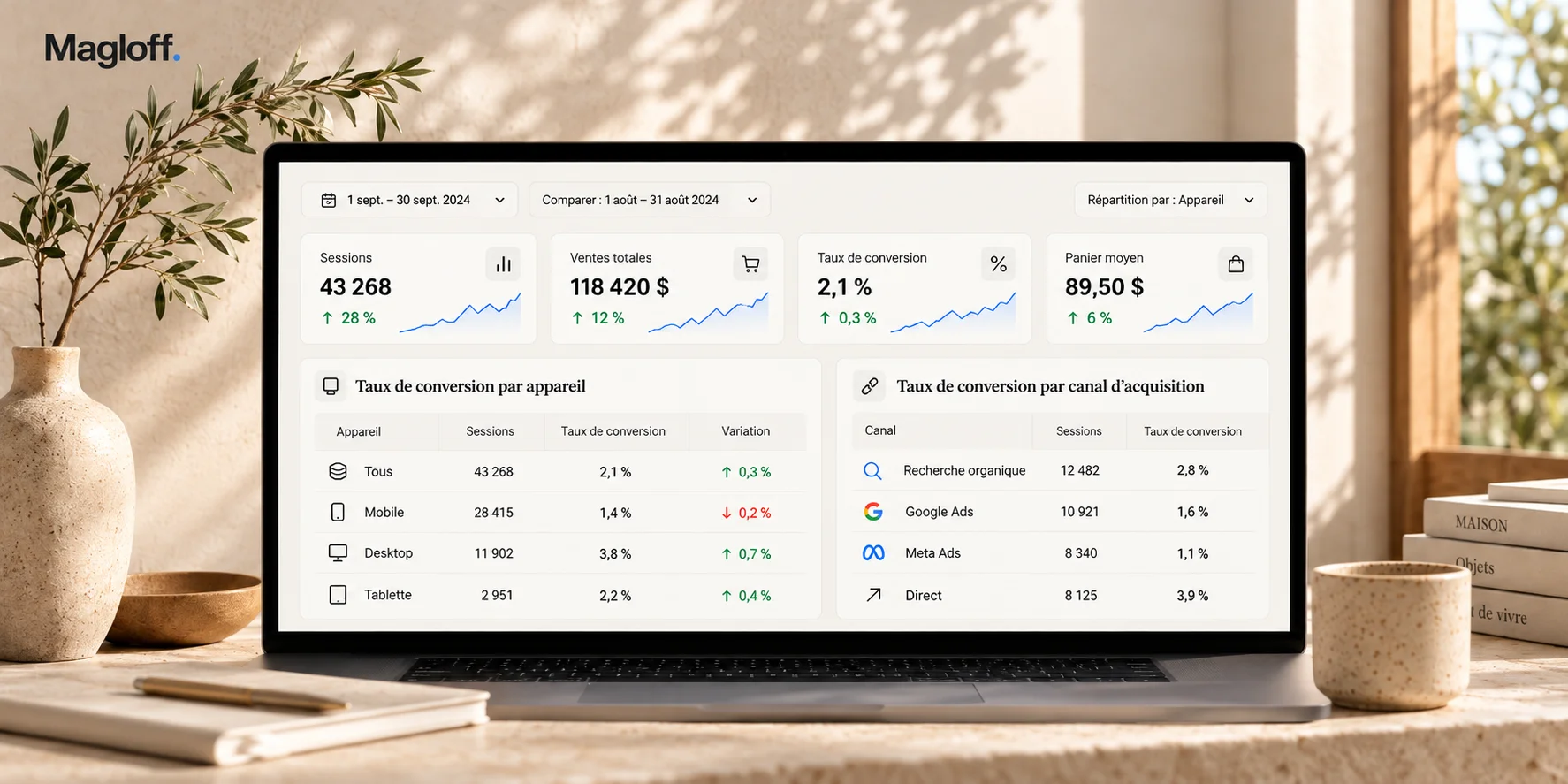
Imagine a store whose overall conversion rate is considered satisfactory. Behind that average, its desktop traffic may be performing very well while mobile lags far behind. Quebec may convert twice as well as the United States. Returning customers may be holding up the average while new visitors convert much less well.
That’s why I rarely look at a Shopify conversion rate as an isolated number.
I prefer to break it down by device, channel, market, customer type, campaign, product category or time period. Those gaps usually tell you far more than an overall average does.
Market data points the same way. Contentsquare’s 2026 Digital Experience Benchmark, based on 99 billion sessions, shows desktop converting at 3.4% on average, or 74% better than mobile web, and returning visitors converting at 2.9% versus 1.7% for new visitors.
4. Your site is responsive, but your mobile experience is still weak
A store can be technically mobile-friendly without ever having been genuinely designed for mobile.
On desktop, a customer sees a large image, the price, the variants, the benefits, the shipping information and some of the reviews all at once. On a phone, they discover these elements one after another. Hierarchy therefore becomes much more important.
A price that’s hard to spot, a variant that’s hard to understand, shipping information placed too far down the page or a poorly positioned add-to-cart button can create far more friction on mobile than on desktop.
And for many brands, most paid traffic now arrives on a phone.
Across all channels, the Contentsquare report puts mobile at nearly 70% of visits.
A mediocre mobile experience is therefore no longer just a usability issue. It’s a commercial one.
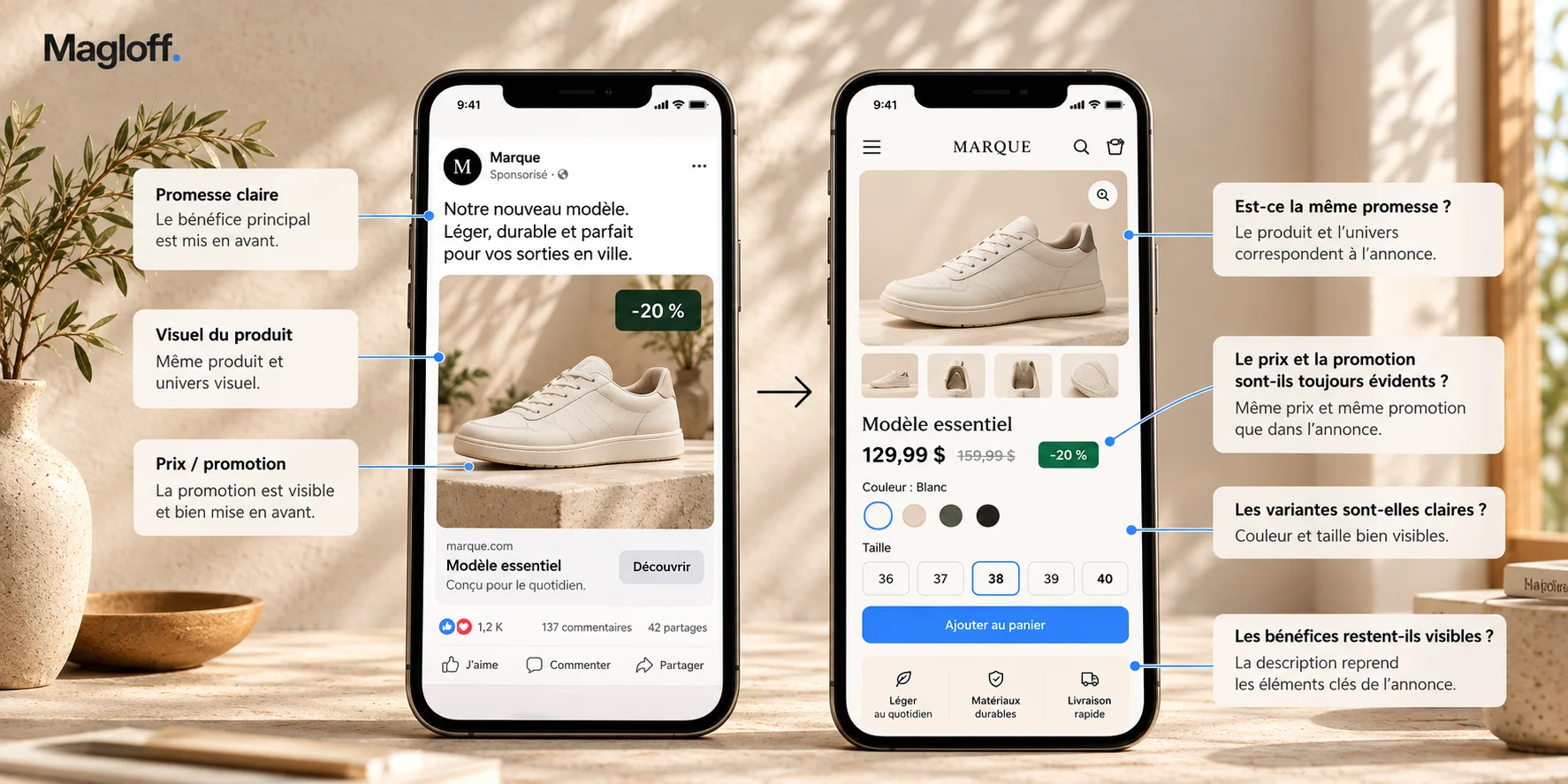
5. Your ad and your landing page aren’t making exactly the same promise
A campaign can be excellent while still sending its visitors to a poor experience.
Suppose an ad highlights a specific model, an offer or a particular feature. If the person clicks and lands on a page where that promise is no longer immediately visible, they have to redo part of the work: find the product again, understand the offer, check the conditions or select the right variant.
That disconnect sometimes seems minor, but it becomes expensive at scale.
An ad campaign and the page it sends traffic to shouldn’t be analyzed separately. Together, they form a single journey.
When I work on a Shopify store, I look as closely at the consistency between the ad and the landing page as at the quality of each one on its own.
6. Your product pages provide plenty of information without necessarily helping people decide
Shopify product pages tend to grow richer over time. Blocks, reviews, comparisons, tables, videos, benefits, guarantees and FAQs get added along the way.
The result can be very complete without being any more convincing.
The important question isn’t whether the product page has enough content. It’s whether it addresses the customer’s real hesitations at the moment they come up.
Depending on the category, those hesitations may concern dimensions, quality, materials, compatibility, shipping, installation, lifespan, returns or simply the ability to picture the product in everyday life.
A good product page doesn’t try to say everything. It helps the visitor make a decision with as little uncertainty as possible.
7. Choosing a variant takes too much effort
Variants seem trivial because they exist on almost every Shopify store. Yet they can become a major obstacle when there are many of them or when they are poorly presented.
The customer needs to understand immediately what they are selecting, what it changes about the product and what price they will pay.
Problems arise when the images don’t properly follow the selected variant, when the names aren’t explicit enough or when several dimensions and options have to be combined mentally.
This is especially true for complex or configurable products, or products sold in many formats.
A variant selector should reduce the effort involved in deciding. As soon as it forces the customer to understand how the interface works before understanding the product, it becomes a source of friction.
8. Your catalog presents products but doesn’t really guide the choice
Merchandising is probably one of the most underestimated levers in e-commerce.
A Shopify collection shouldn’t just be a grid of products sorted by date, popularity or manual order. It should help visitors understand what they ought to look at first.
Which products are the most accessible? Which ones best represent the brand? Which items convert new visitors particularly well? Which ones then make it possible to trade up?
These choices directly shape the way a customer discovers what you sell.
On a large catalog, reworking the product order, navigation, filters or the way the different product families are featured can sometimes have more impact than a far more spectacular feature.
9. Your promotions lift sales but make your offer harder to read
Promotions quickly become complex.
A regular price sits next to a strikethrough price. An automatic discount stacks on top of a code. Shipping becomes free above a certain threshold. A few products are excluded. Some variants get a different offer.
Each of these rules may have a sound commercial rationale. The problem arises when the customer has to work out for themselves the price they will end up paying.
An effective promotion obviously has to be attractive, but above all it has to be easy to understand.
The more complex the mechanics become, the more they risk diluting the impact of the benefit being offered.
10. You’re trying to raise average order value before securing the main purchase
Bundles, accessories, recommendations, upsells and free-shipping thresholds are all useful levers for increasing average order value.
They shouldn’t, however, pull attention away from the main decision.
On some stores, customers are shown several additional offers before they have fully understood the product they are considering.
The result is sometimes the opposite of what was intended: more options, but also more decisions.
Average order value optimization works particularly well when the initial decision is already simple and reassuring. If that isn’t the case yet, it’s often better to resolve that first point of friction before adding new levers.
11. Your shipping policy becomes an objection at the cart stage
Shipping is often treated as a technical setting in Shopify. In practice, it is an integral part of the offer.
The amount charged, the free-shipping threshold, the stated delivery time, the regions covered, the exceptions, the distance, the size of the product or the warehouse the order ships from all directly affect how the price is perceived.
Someone can be completely sold on a $150 product, then change their mind entirely when they discover $35 in shipping at checkout.
Baymard Institute, which puts the average cart abandonment rate at around 70% across 50 studies, ranks extra costs that are too high (shipping, taxes, fees) as the leading reason for abandonment: they are cited by 40% of US shoppers who abandon an order for reasons other than simply browsing.
The reverse is also true: always offering free shipping can improve conversion while severely eroding margin on certain orders.
A good shipping policy therefore looks for a balance between conversion, average order value, clarity of the offer and profitability.
12. Your payment options don’t fully match your cart
Shopify’s checkout performs extremely well, but that doesn’t mean every store should be configured the same way.
On a relatively small order, offering four different financing options probably won’t make much difference. On a cart worth several hundred or several thousand dollars, by contrast, installment payments can completely change how the price is perceived.
The right choice depends on the type of product, the average order value and the way customers behave.
Adding a new payment method is only worthwhile if it removes a real objection.
13. Your checkout sometimes reveals a problem that started much earlier
Cart abandonment is often interpreted as a problem located in the cart or at checkout.
That isn’t always the case.
A customer can reach that stage with an unanswered question about shipping, delivery time, returns, compatibility or warranty. The cart then becomes the place where they go looking for an answer they ideally should have received earlier.
If they don’t find it, they leave.
Analyzing a funnel strictly step by step can therefore be misleading. Friction that shows up at the end of the journey may well have been created several screens earlier.
14. Your logistical constraints are starting to show for your customers
As an e-commerce business grows, its operations naturally become more complex.
The brand may have several warehouses, sell in several countries, manage different inventory by market or carry products whose shipping constraints vary widely.
At that point, a poorly configured logistics rule can turn into real commercial friction: a product that’s visible but can’t be purchased, an order that can’t ship together, a surprising rate or an inconsistent delivery time.
These issues sometimes look like UX problems when they actually originate in operations.
That’s also why an e-commerce audit can’t be limited to looking at the store from the front end.
15. You have plenty of data, but it doesn’t always tell you what to do
Shopify, GA4, Google Ads, Meta, Search Console, Klaviyo and the various apps installed on a store produce an enormous amount of information.
The challenge is no longer getting data. It’s knowing which data genuinely deserves to influence a decision.
A dashboard with fifty metrics can create an impression of precision while making the situation harder to read.
A conversion rate on its own doesn’t mean much. The same goes for CAC or average order value.
What becomes interesting is how they relate to one another: how CAC changes as the share of new customers grows, how conversion varies by channel, how a promotion affects average order value and margin at the same time.
Analysis becomes useful when it lets you move from a number to a decision.
16. Your store has been built by accumulation
This is a very common pattern on mature Shopify stores.
A new app addresses a need. A few months later, a new block is added to the product page. Then a promo bar, a review system, new navigation, a pop-up or a widget.
Each of these decisions probably made sense at the time it was made.
The problem arises when nobody steps back to reassess the whole.
After a few years, some stores carry several layers of optimizations that no longer really work together. The experience gets heavier and technical dependencies pile up.
In these situations, the most useful improvement sometimes means removing or simplifying something rather than adding a new feature.
17. Your team has plenty of good ideas, but no obvious priority
This is probably the situation I encounter most often.
Teams are usually very good at spotting possible improvements. They would like to rework the homepage, improve the product pages, relaunch certain campaigns, add financing, build out SEO, revise the menu, automate emails or test a new promotion.
The problem isn’t a lack of ideas.
It’s the order in which to tackle them.
A small or mid-sized business rarely has the time, budget and resources to launch ten initiatives at once. The quality of the strategy therefore depends largely on its ability to distinguish what would simply be useful from what is genuinely a priority.
That is precisely where an audit becomes valuable.

The trap: turning these 17 points into a simple checklist
After going through this list, it would be tempting to open your store and check each of these items one by one.
The exercise can be worthwhile, but it has an important limitation: a symptom doesn’t always point to its cause.
Take a drop in mobile conversion rate. It may come from the store’s usability, but also from a new ad campaign attracting much colder traffic, a price change, a promotion, a shipping issue or simply a different product mix.
Immediately applying a UX fix because mobile conversion has dropped would mean treating a hypothesis as a certainty.
Spotting an anomaly is therefore only the beginning of the diagnosis.
The real value lies in connecting several signals to understand what is causing them.
How do you know what’s really holding back a Shopify store’s sales?
I generally bring the analysis back to three questions.
Where is performance breaking down?
The first step is to locate the problem. Acquisition, landing page, catalog, product page, cart, checkout or retention: each stage can contribute to overall performance.
The aim is to progressively narrow the scope of the analysis rather than optimizing the entire store without a clear direction.
Why is performance breaking down?
This is usually the most interesting part.
A single data point rarely provides an answer. It has to be cross-referenced with traffic sources, user behavior, recent changes to the site, commercial constraints and sometimes even operations.
It’s this combination that makes it possible to tell a cause apart from a mere correlation.
Which action deserves to come first?
Even when an audit identifies ten relevant improvements, they don’t all carry the same value.
So I try to estimate their commercial potential, the effort they require, their urgency and how they depend on other initiatives.
A relatively simple action can sometimes deliver more results than a complete redesign carried out over three months.
Should you increase your Google Ads budget when sales plateau?
Not necessarily.
Scaling acquisition is extremely effective when the store already turns additional traffic into profitable sales.
In that case, more budget can indeed accelerate growth.
When there is significant friction in the journey, however, a bigger budget amplifies that weakness as well. Part of the additional investment simply sends more visitors toward the same problem.
Before significantly increasing Google Ads or Meta Ads spend, it’s therefore worth checking that acquisition really is the main constraint.
Traffic is an accelerator. You still need to be sure of what it’s accelerating.
Should you rebuild your Shopify store to increase sales?
Here again, not automatically.
A complete redesign is sometimes the right decision, particularly when a theme genuinely limits the experience or when the store’s architecture no longer fits the business.
But many stores that have plateaued don’t need to be rebuilt from the ground up.
The problem may lie in the product pages, merchandising, shipping, tracking, acquisition or a few specific parts of the customer journey.
Rebuilding the entire site before understanding what is limiting its performance amounts to choosing the solution before making the diagnosis.
A redesign should be a response to an identified problem, not a substitute for analysis.
What is a good Shopify conversion rate?
It’s one of the most frequently asked questions, and also one of the hardest to answer with a simple benchmark.
Conversion rate depends heavily on the industry, product price, customer type, country, brand maturity, traffic sources and the share of new visitors.
A furniture store, a cosmetics brand and a site selling $20 accessories have no reason to aim for exactly the same rate.
As a rough order of magnitude, across 426 Shopify stores between July and October 2026, Littledata measured a median conversion rate of 1.4%, with the top 20% above 2.7% and the top 10% above 3.5%.
Benchmarks can provide a point of reference, but I generally prefer to compare a store with itself.
How is its conversion rate evolving over time? What’s happening on mobile? Which channels are growing or declining? Do new visitors behave differently from returning customers? Do some product families convert much better than others?
These comparisons often reveal far more concrete opportunities than an average figure taken from a study.
When should you run a Shopify audit?
A Shopify audit becomes particularly useful when the store is already working but decisions are getting harder to prioritize.
That can happen when revenue stalls despite higher investment, when acquisition costs keep rising, when conversion drops with no obvious explanation or when the team accumulates several projects without knowing which one to tackle first.
It’s also relevant before a major redesign, when expanding into a new market or simply when the business senses that its e-commerce could perform better without being able to pinpoint exactly why.
At that stage, yet another list of best practices usually adds little value.
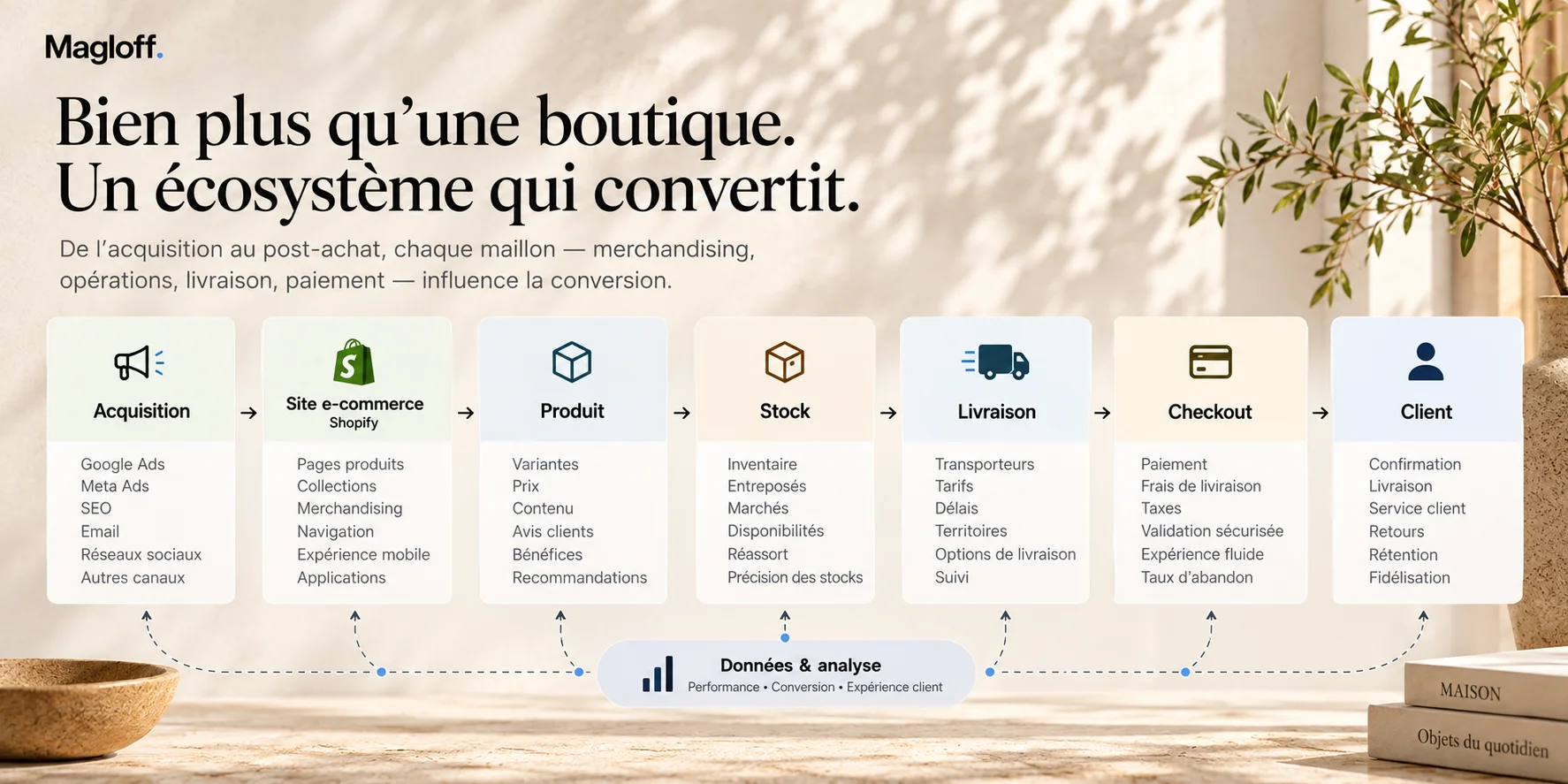
What matters most is being able to bring acquisition, customer experience, catalog, technology, data and operations together into a single reading.
A good e-commerce audit should reduce the number of decisions, not add to them
It’s relatively easy to open a Shopify store and find fifty things that could be improved.
The hard part is identifying the five that genuinely deserve time and budget.
That is the approach I apply at Magloff.
I analyze a store the way I would look at an e-commerce business I was directly responsible for: acquisition, conversion, merchandising, data, customer experience, operations and profitability all have to work together.
The most useful deliverable, then, isn’t a long checklist.
It’s a clear hierarchy of problems and opportunities.
Where is the main constraint on your growth today? Which action can have the most impact? What can wait? What absolutely shouldn’t be redone until the causes are better understood?
If your Shopify store is already selling but you feel it could do better, that is exactly the kind of situation where an outside diagnosis becomes valuable.
Explore the Magloff e-commerce diagnostic
Or, if you’d simply rather walk me through your situation:
Magloff works with Shopify brands and e-commerce SMBs in Montreal and across Quebec on conversion, profitable acquisition, customer experience and sales growth.