

When Meubles TOCO asks me to rework their shipping setup in Shopify, the need looks simple enough: charge each customer based on how far they are from the nearest store.
On paper, the rule fits in a few lines. Free delivery near the stores, then several pricing tiers as distance increases, up to a long-distance rate for orders further out.
Inside Shopify, however, that logic does not exist as such.
TOCO has two stores in Quebec, plus a warehouse that must stay out of the calculation. Distance has to be measured from the customer’s address, compared against both stores, and the closest point of sale selected automatically.
So the task is not simply to “configure shipping rates”. It means translating a logistics rule specific to the business into logic Shopify can understand and apply instantly at checkout.
Clarify the rule before writing any code
With this kind of need, the first question is not technical. It is about defining precisely what Shopify has to calculate.
Which location serves as the reference? Which distance do we use? What happens when a customer lives beyond the last planned tier? And above all, which rules need to be easy to change later?
For TOCO, the logic takes shape quickly: the customer’s address is compared to both stores, the closest one is selected, then Shopify displays the rate matching the calculated distance.
From there, we can start choosing the right architecture.
A Shopify app is not automatically the best answer
Apps exist that handle advanced shipping rates. For some merchants, they are the fastest route.
In TOCO’s case, though, the need is very targeted. Adding an app also means adding a subscription, another interface and a dependency, all to handle a fairly specific rule.
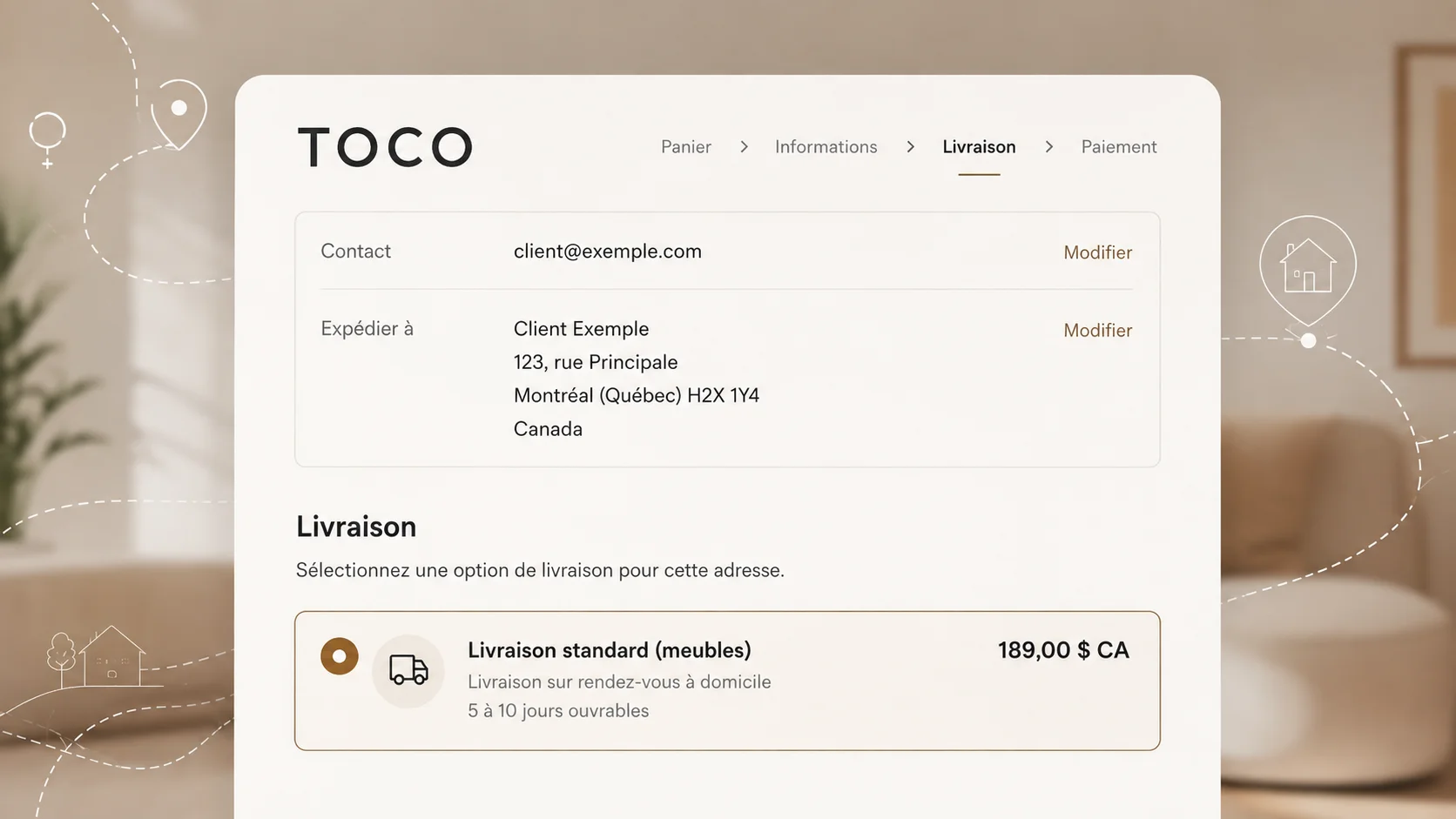
So I favour an integration that builds directly on Shopify’s own capabilities. When the customer enters their address at checkout, the system calculates the distance to the relevant stores, identifies the right tier and returns the rate to Shopify.
For the customer, all of that logic stays invisible. They fill in their address and simply see their shipping price appear.
Shopify remains the control centre
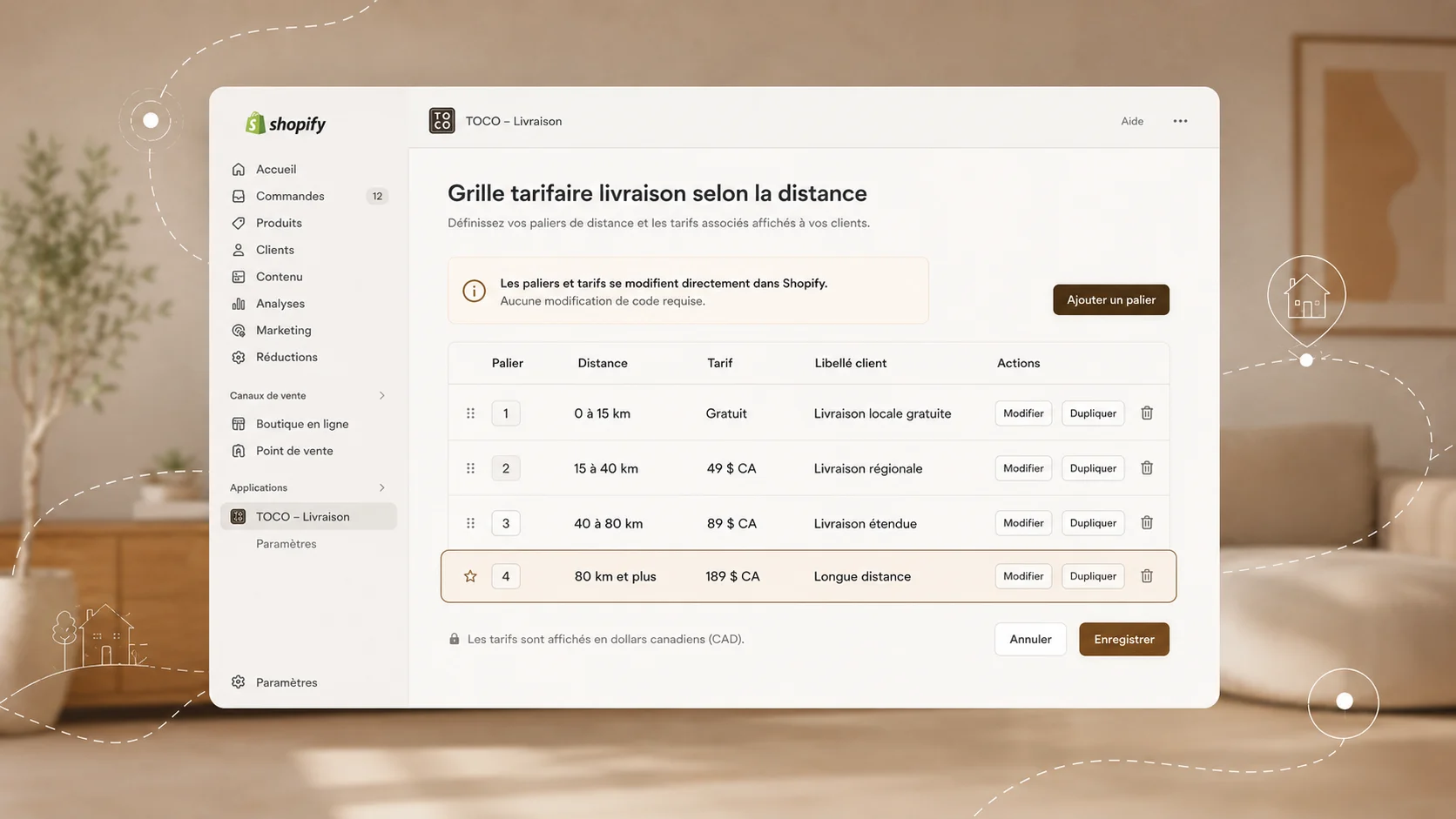
The calculation can be customised without locking TOCO into code. That matters.
Distances and shipping prices are commercial rules. They have to be able to change without requiring technical work every time.
The rate grid is therefore managed directly from Shopify. The development handles the calculation, while the TOCO team keeps control over the tiers and the prices.
The code handles the logic. Shopify stays the place where the business runs its commerce.
Testing a business rule, not just code
Once the system is live, I test several situations directly in the checkout. Near a store, delivery is free. In Laval, the matching rate appears. In Quebec City, another tier takes over.
Then a more distant address exposes a limit in the initial grid: beyond 400 kilometres, no rate had been planned.
The development works. It is the commercial rule that stops too early. So we add a long-distance tier directly in Shopify, without touching the mechanics of the system.
That is precisely why the commercial configuration stays separate from the development: a new situation should not automatically trigger new technical work.
The checkout also reveals configuration inconsistencies
Another point surfaces during testing. An old flat rate is still active in Shopify. It shows up alongside the newly calculated rate, and can therefore be selected by the customer whenever it is cheaper.
It has to be removed before going live.
This is not a development problem, but it is part of the same job: an integration is only truly finished when the complete purchase journey produces the right outcome.
What TOCO actually gains
TOCO now has shipping logic that matches its real geography. The rate accounts for the nearest store, displays directly in Shopify, and rests on a grid the team can edit themselves whenever their shipping policy changes.
Without adding an app solely to handle this one need.
That is also what interests me in this kind of Shopify engagement: starting from the reality of the business rather than from a tool or an off-the-shelf solution.
Sometimes an app is enough. Sometimes Shopify already solves the problem natively. And sometimes a few custom building blocks produce a solution that is simpler to live with over the long run.
Frequently asked questions
Can Shopify calculate shipping rates based on distance?
Yes. Depending on the need, this can be handled through an app or through a custom calculated-rates system.
The difficulty lies less in the calculation itself than in defining the rule: which location to use, which distance to measure, which tiers to apply and how to handle the cases that fall outside normal operations.
Can Shopify use the store closest to the customer?
Yes, with the right logic. In TOCO’s case, only two stores take part in the calculation, even though other locations exist in Shopify.
The location used to calculate a shipping rate therefore does not have to be the same one used afterwards to fulfil the order.
Do you always need a paid Shopify app?
No. An app is sometimes still the best solution. But when a business rule is specific enough, a custom integration can avoid an extra dependency while leaving more control with the merchant.
The right choice mostly depends on the level of complexity, the long-term cost and how much autonomy you want.
Adapting Shopify to how the business actually works
This project is a fair illustration of how I approach a Shopify engagement.
Understand the business rule first. Identify what Shopify already does. Add only the logic that is missing. And above all, leave the merchant in control of everything that needs to change without a developer.
The approach applies well beyond shipping: catalogue, variants, merchandising, tracking, automations or specific integrations.